Envoy Rooms

The Problem
Hybrid work broke conference room booking.
A manager schedules a 30-person meeting. Their calendar tool — Google, Outlook, Zoom Rooms — books a 30-person conference room. But on the day of the meeting, only 5 attendees are in San Francisco. 7 are in New York. 3 are in Denver. 15 are working from home. The 30-person room sits mostly empty, while smaller rooms are overbooked, and distributed teams scramble to find space that actually fits them.
The root cause: every room booking tool in the market plans for the invite list, not who's actually showing up. No tool knew where employees were working on any given day.
Envoy did.
Role
Sole Product Designer
Worked with a team of 8 engineers to implement
Project Timeline
6 months
Responsibilities
User research
Interaction design
Usability testing
My Role + How I Got Here
Before joining Envoy, I was the founding designer at OfficeTogether — a workplace coordination startup building toward exactly this problem. When Envoy acquired OfficeTogether to accelerate the Rooms buildout, I came with the team: sole product designer, working alongside 8 engineers and a PM, picked specifically because of my domain expertise in hybrid office coordination.
I owned the full design process from day one: foundational usability research on the existing beta product, iterative milestone releases, cross-platform design across tablet, mobile, and web, and the feature work that made Envoy Rooms the fastest-growing ARR SKU at Envoy in 2022.
The backend system we shipped together supported over 1,000 QPS across a developer API, Android tablets, iPads, iOS, Android mobile, analytics dashboards, and Microsoft/Google calendar sync — simultaneously.

Usability research on the beta design surfaced four critical gaps before any backend was built."
Research + Discovery
When I arrived, Envoy Rooms existed as a visually designed tablet interface with no meaningful backend functionality, live only at Envoy’s HQ. My first move was to run usability research before the engineers built anything they'd have to rebuild. I conducted sessions with both existing beta admins and prospective customers. What I found:
Rooms were unidentifiable at a glance. The display was text-heavy and dense — in a real hallway, walking past a tablet to find a free room, users couldn't quickly parse what was available. Room names, availability status, and meeting details competed for attention equally.
Colorblind users were flying blind. Availability was communicated through color alone, with no secondary indicator. A significant portion of users couldn't distinguish available from occupied.
Booking from the tablet itself was expected, not optional. Users assumed they could walk up and book a meeting spontaneously. The beta design didn't support this — it was display-only.
Mobile was table-stakes. Users expected to check room availability and book from their phone, not just from the wall-mounted display.
These four findings defined the first release scope.

A restructured visual hierarchy made room name and availability status immediately scannable — critical for a display users interact with in motion, not seated at a desk.
Design Iteration: The Tablet Overhaul
I mocked up solutions to each finding and ran them back through beta and prospective customers in rapid feedback cycles. The engineering team implemented changes in parallel — we were releasing to new beta customers weekly while actively iterating.
Key design decisions:
Visual hierarchy restructure. Room name became the dominant element — large, immediate, scannable. Availability state moved to a persistent color + icon system so colorblind users had two independent signals. Meeting details were deprioritized to secondary hierarchy.
Interactive schedule timeline. The original design showed a static timeline. Users consistently tried to tap it to navigate forward, check upcoming availability, or book directly. We made it interactive — tappable blocks, forward/backward navigation, and a clear visual language for occupied vs. free slots.
On-tablet meeting creation. I designed a full "create meeting" flow directly on the tablet for impromptu bookings — name, duration, and optional attendees — that synced immediately with the connected calendar system.
Envoy mobile booking. Designed the room browsing and booking flow within the existing Envoy mobile app, allowing employees to find and reserve rooms from anywhere in the building before walking to them.
Updated design to make schedule interactive
Usability Testing + The Slack/Teams Discovery
After releasing to six beta customers, we hit a wall: company admins wouldn't grant us direct access to their employees for testing. Rather than accept secondhand feedback as our only signal, I found two workarounds.
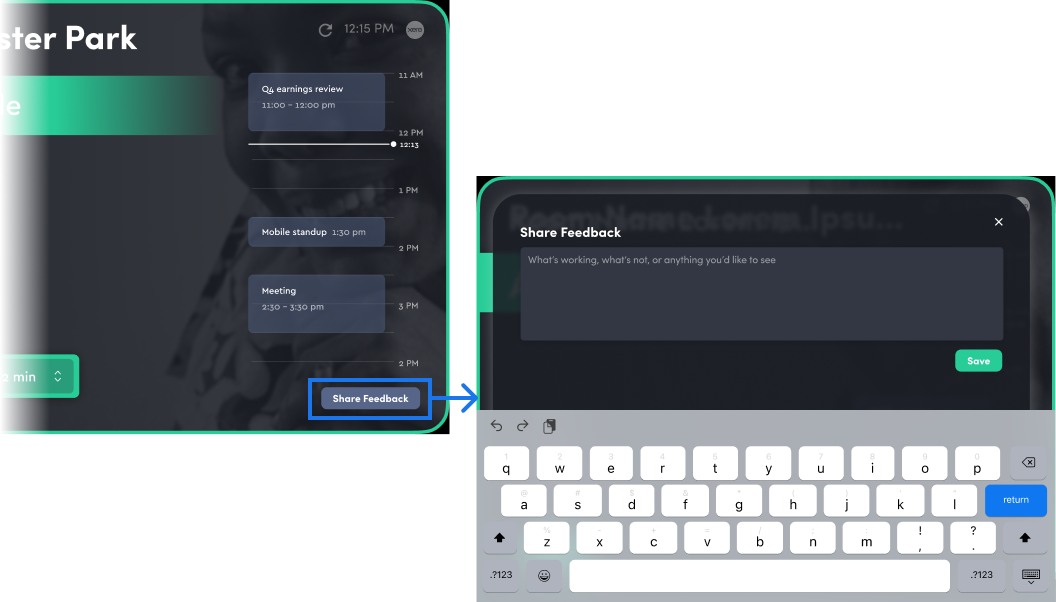
First, I added an in-product feedback mechanism directly on the tablets — a persistent but unobtrusive prompt that let employees submit feedback in the moment, right after an interaction. This gave us behavioral signal without requiring admin-mediated access.
Second, I ran structured usability tests with Envoy employees using it for the first time — giving me a controlled environment to watch real first-use behavior without the access constraints.
This is where the Slack and Teams integration gap surfaced. Employees at companies using these tools for meeting coordination expected room booking suggestions to flow through the same channel. It hadn't come up in admin research because admins didn't use these tools the same way employees did — a meaningful reminder that admin feedback and end-user feedback are not interchangeable.
Admin permissions dashboard
Permissions Architecture
As the beta expanded, it became clear that "one booking model fits all" didn't hold. Different companies had fundamentally different philosophies about who should control room access:
Some wanted any employee to be able to book any room freely
Some had executive or sensitive-use rooms that required manager approval
Some wanted only admins to have booking rights at all, with employees limited to viewing
I designed a permissions settings system in the admin dashboard that gave companies full control over booking rights — by room, by employee role, and by location. This became a meaningful driver of enterprise adoption, as larger companies with complex office policies couldn't operate without it.

Presence-aware room rightsizing - the feature no calendar tool could replicate.
Slack & Teams Integration: Presence-Aware Room Rightsizing
This was the feature that made Envoy Rooms genuinely differentiated — the one no competitor could replicate.
When a meeting was booked through Google Calendar or Outlook, Envoy cross-referenced the invite list against desk reservation data to calculate how many attendees were actually planning to be in each office on that day. If the booked room was significantly oversized — or in the wrong location — the meeting organizer received a proactive suggestion through Slack or Teams:
Companies could configure this to work two ways: automatic reassignment for organizations that wanted zero friction, or approval-based suggestions for organizations that wanted organizers in the loop. The integration worked across both Slack and Microsoft Teams.
This was the feature that had been technically out of reach at OfficeTogether. At Envoy, with the presence data infrastructure already in place, we could finally build it.

The analytics dashboard gave admins visibility into utilization patterns across locations - turning passive booking data into active space planning intelligence.
Room Analytics Dashboard
To help admins make smarter space planning decisions, I designed a room usage analytics dashboard on web. Admins could see:
Which rooms were most and least utilized across locations
Peak booking times by room and floor
Patterns in no-shows and early releases
Occupancy vs. capacity trends over time
This gave facilities and operations teams the data to make evidence-based decisions about room configuration, furniture, and allocation — particularly valuable for companies managing multiple offices with different usage patterns.

Impact
Envoy Rooms launched as the fastest-growing ARR SKU at Envoy in 2022. Adoption among existing Envoy customers exceeded our 10% KPI, and the product was absorbed into the Envoy Workplace bundle — which went on to become Envoy's most widely-used product offering.
The backend infrastructure we shipped handled 1,000+ queries per second across 8 simultaneous platforms: Android tablets, iPads, iOS, Android mobile, the developer API, analytics, web dashboards, and Microsoft/Google calendar sync workers.
What I Learned
The research gap between admins and end users is real and consequential. Admins buy the product; employees use it. Their mental models, workflows, and pain points diverge significantly. The Slack/Teams blind spot was a direct result of only hearing from one side. I'd build explicit end-user access into the research plan from day one on any future project.
Presence data is only as powerful as the surfaces it flows through. The core insight — Envoy knows who's actually in the office — was available from the beginning. The design work was figuring out where and how to surface that intelligence so it changed behavior without adding friction. The Slack/Teams integration was the answer: meet people where they already make decisions.
Acquired expertise is a design advantage. Coming in with OfficeTogether's context — the user research we'd done, the product decisions we'd debated, the dead ends we'd already hit — meant I wasn't starting from zero. The first three months moved fast in part because I'd already spent years thinking about this problem space.
